
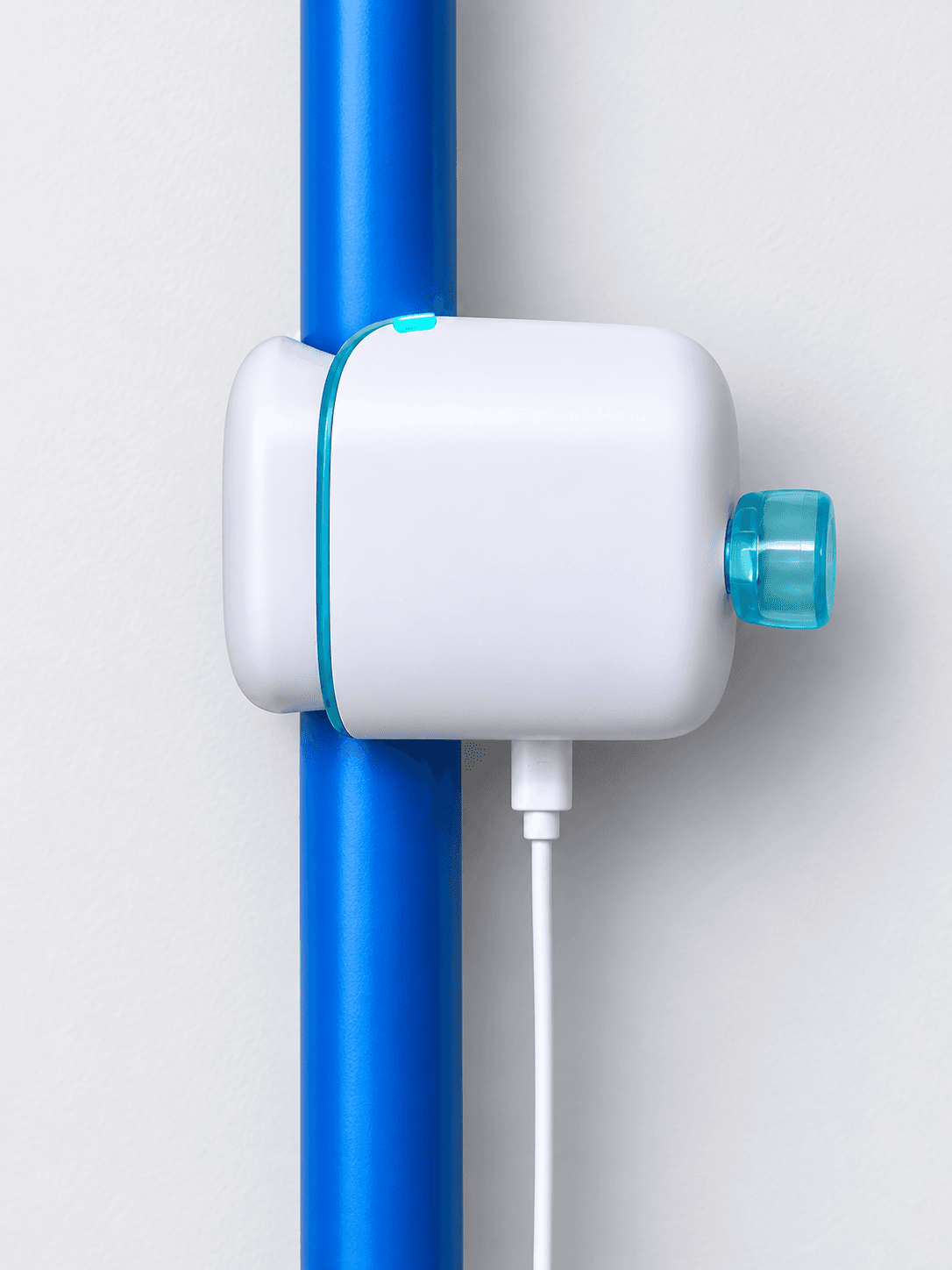
I didn’t think I had a water problem. I didn’t think I needed to know how many litres my irrigation system uses on a Tuesday. Then I clamped a Hydrific Droplet onto my main water line, and within the first week it told me things about my own house I genuinely didn’t know.
I’ve been running it for almost a month now. Short version: it’s remarkably accurate, it’s sensitive enough to notice the smallest flow, and it’s one of the few smart home gadgets I’d actually pay for myself.
Disclosure: Hydrific sent me a Droplet to review. They didn’t pay for this article and didn’t see it before it was published. Some links below are affiliate links. If you buy through them, AnythingTech may earn a small commission at no extra cost to you. It never changes our verdict.
Advertisement
Reader deal: save on the Droplet with our link or code
anythingtechat checkout. When I checked, it took US$31 off in the US and C$44.81 off in Canada.
What Is the Hydrific Droplet?
The Droplet is a whole-home water monitor that clamps onto the outside of your main water pipe. There’s no cutting, no plumber, and nothing inline with your water. According to Hydrific, it uses dual ultrasonic sensors that read flow more than 50 times per second and can detect flows as small as 0.026 gallons (about 0.1 litres) per minute.
From that flow data, the app works out what’s using water — showers, toilets, faucets, irrigation — and alerts you when water runs when it shouldn’t.
Key specs (from Hydrific):
- Install: Clamp-on, tool-free, near your shutoff valve
- Pipes: Copper, PEX, CPVC/PVC, PE and brass, ½" to 1¼" nominal
- Power: Plug-in adapter (needs an outlet within about 5 ft)
- Connectivity: Wi-Fi at the install location
- Rating: IP64 water-resistant, indoor or outdoor
- Subscription: None. One-time purchase
- Warranty: 2-year limited, plus a 30-day money-back guarantee
- Price: US$249 / C$360 before tax and discounts. Hydrific runs frequent sales.
The Droplet lists at US$249 / C$360 before tax and discounts, and Hydrific runs sales often. Our code gets you more off: use our link or enter anythingtech at checkout. When I checked, it took US$31 off in the US and C$44.81 off in Canada. Note that Hydrific doesn’t currently ship to Quebec.
Installation: About 30 Seconds
Hydrific says install takes minutes. For me it took seconds. You find a straight run of pipe near your main shutoff, clamp the Droplet on, plug it in, and pair it with the app over Wi-Fi.
I was lucky to have an electrical outlet right next to where the main water line comes into the house. Clamping it around the pipe and plugging it in took about 30 seconds. If you don’t have an outlet within about 5 ft of your main line, plan for an extension cord or a new outlet.
Clamp, cable and power adapter. That’s the whole install.
Accuracy: It Notices Everything
This is the part that impressed me most. The Droplet is very sensitive. Even small, short flows show up in the app in real time, and the readings have lined up with what I know about my house.
That sensitivity is the whole point. A slow leak or a running toilet is exactly the kind of low, steady flow you’d never notice until the water bill arrives.
Two Moments That Sold Me
The reef tank RO water alarm
I keep a saltwater reef tank, which means filling bins with RO (reverse osmosis) water from time to time. An RO system runs slowly for a long time, which looks a lot like a leak.
Sure enough, the Droplet flagged it: water had been running continuously for a long stretch. It was the right call. If that had been a burst line in the basement, I’d want to know.
The useful part is what came next. I could tag the event with a custom label, so the Droplet learns that this pattern is normal. The next RO fill was recognised instead of setting off another alarm.
The 2 AM notification
One night I got a notification at 2 AM: water was flowing. Nobody was up.
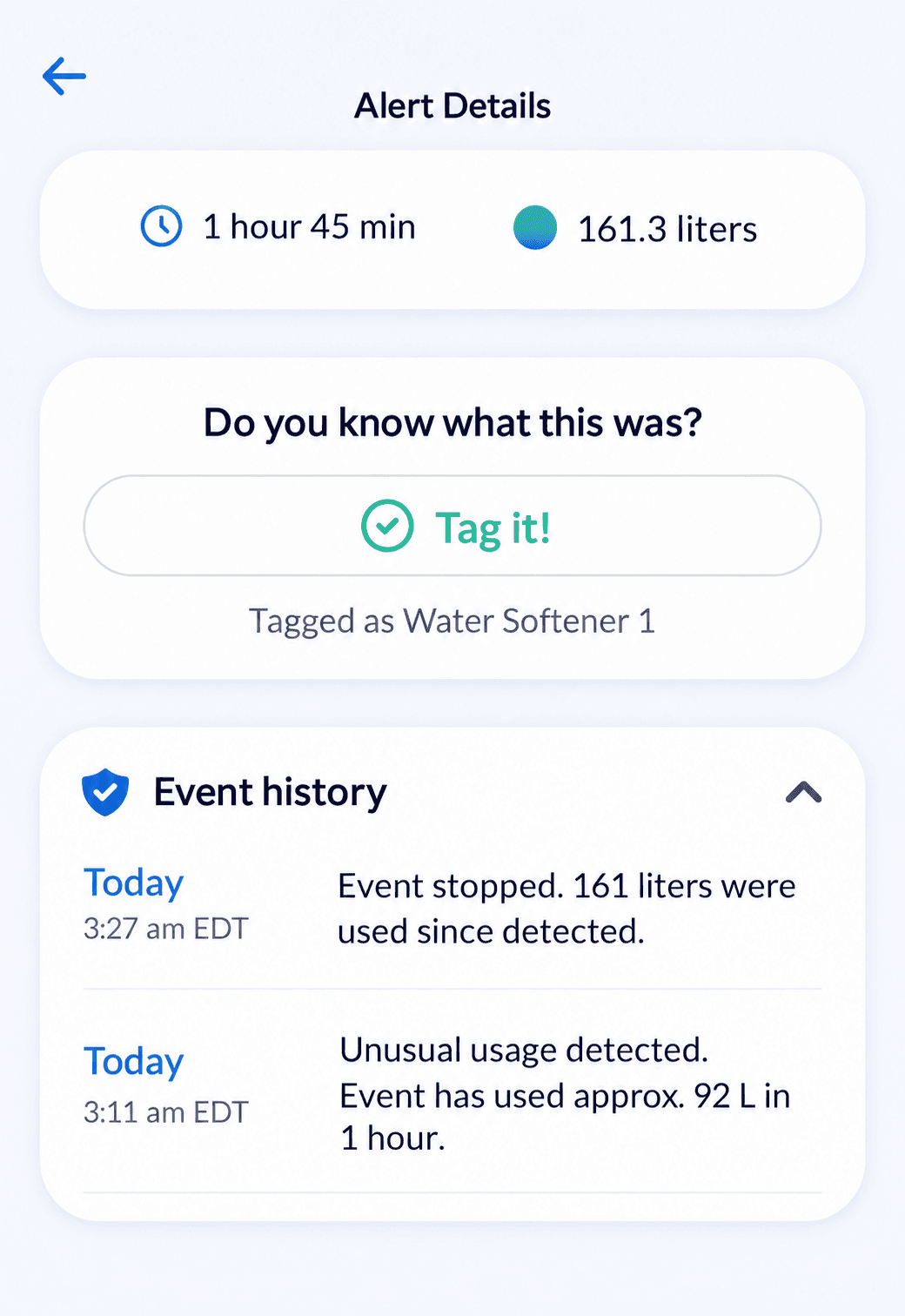
It turned out to be my water softener running its regeneration cycle, something it does on a schedule in the middle of the night that I’d completely forgotten about. I hadn’t tagged it yet, so the Droplet did exactly what it should: it told me something unusual was happening while the house was asleep.
This is what a water monitor is for: finding the things you don’t know are happening.
Now it’s tagged, and those regenerations show up as normal events.
Everything It Tracks Around the House
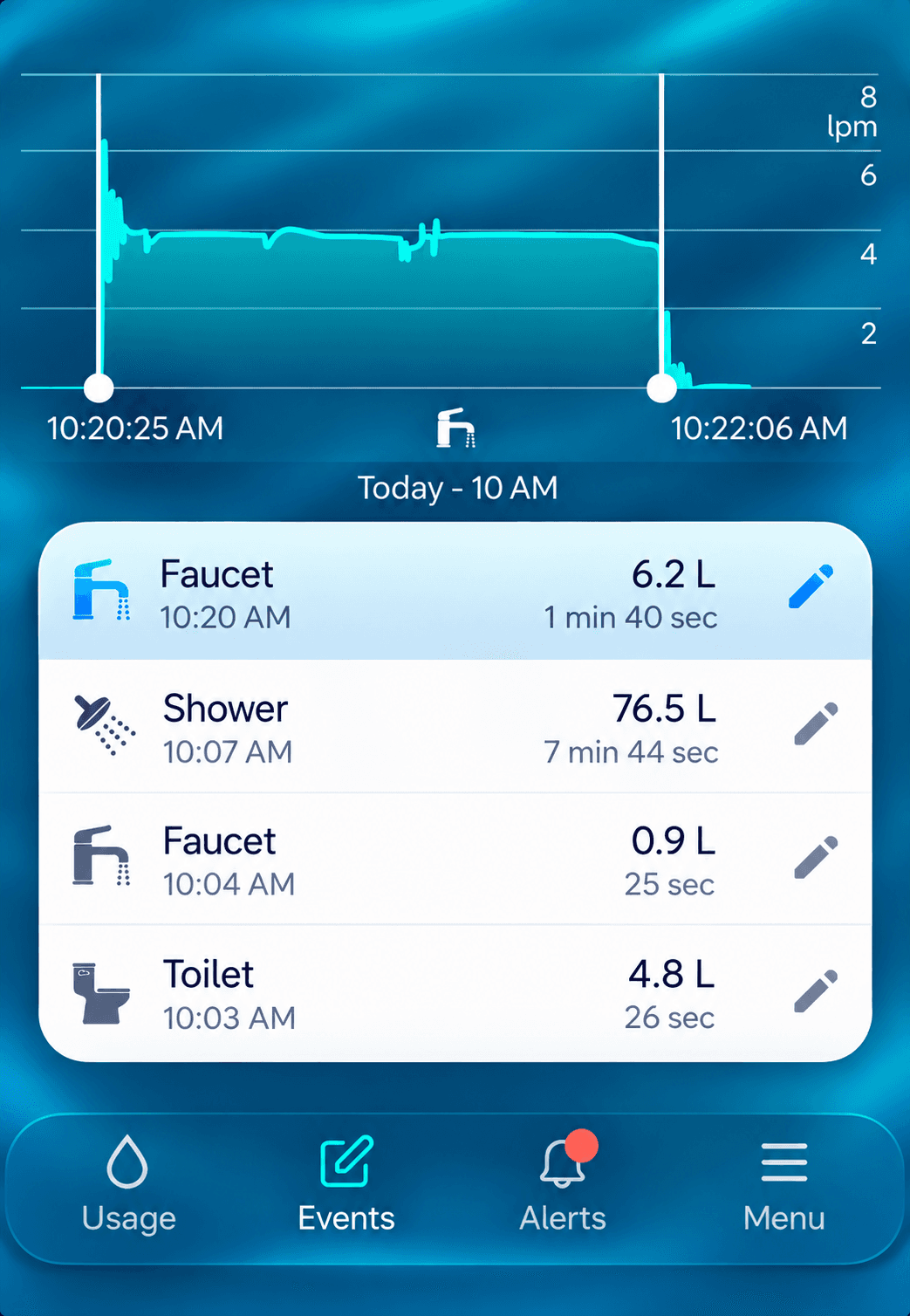
Because it sits on the main line, the Droplet sees every outlet in the house, inside and out. In my home that includes:
- Outdoor hose — every garden and car-wash session
- Irrigation system — each zone run, so I can see what watering actually costs
- Water softener — regeneration cycles
- Reef tank RO top-ups
- Showers, toilets, faucets and appliances
The App: Real-Time Data Done Right
The Droplet app is the best part of the experience. It’s clean, fast and genuinely useful rather than a pile of graphs.
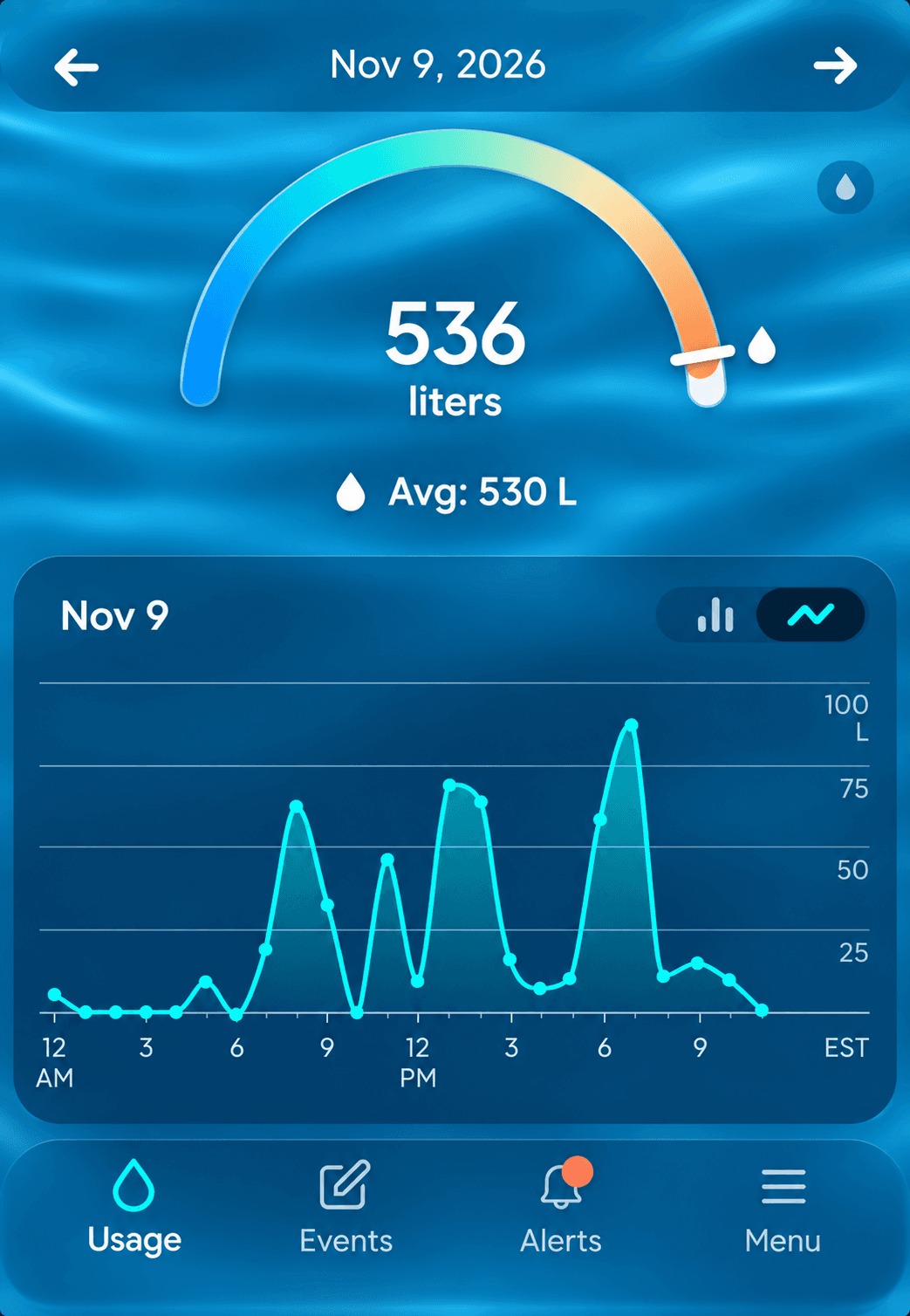
- Real-time flow — watch water use live as you turn on a tap
- Event history — each event with its volume, duration and flow rate
- Hourly, daily, weekly and longer views — zoom from today out to the whole year
- Daily and weekly reports — a summary of where your water went
- Threshold alerts — set a limit and get notified if you go over it
- Custom event tags — teach it what’s normal in your house, like RO fills and softener cycles
Pro Tip: Train It Fixture by Fixture
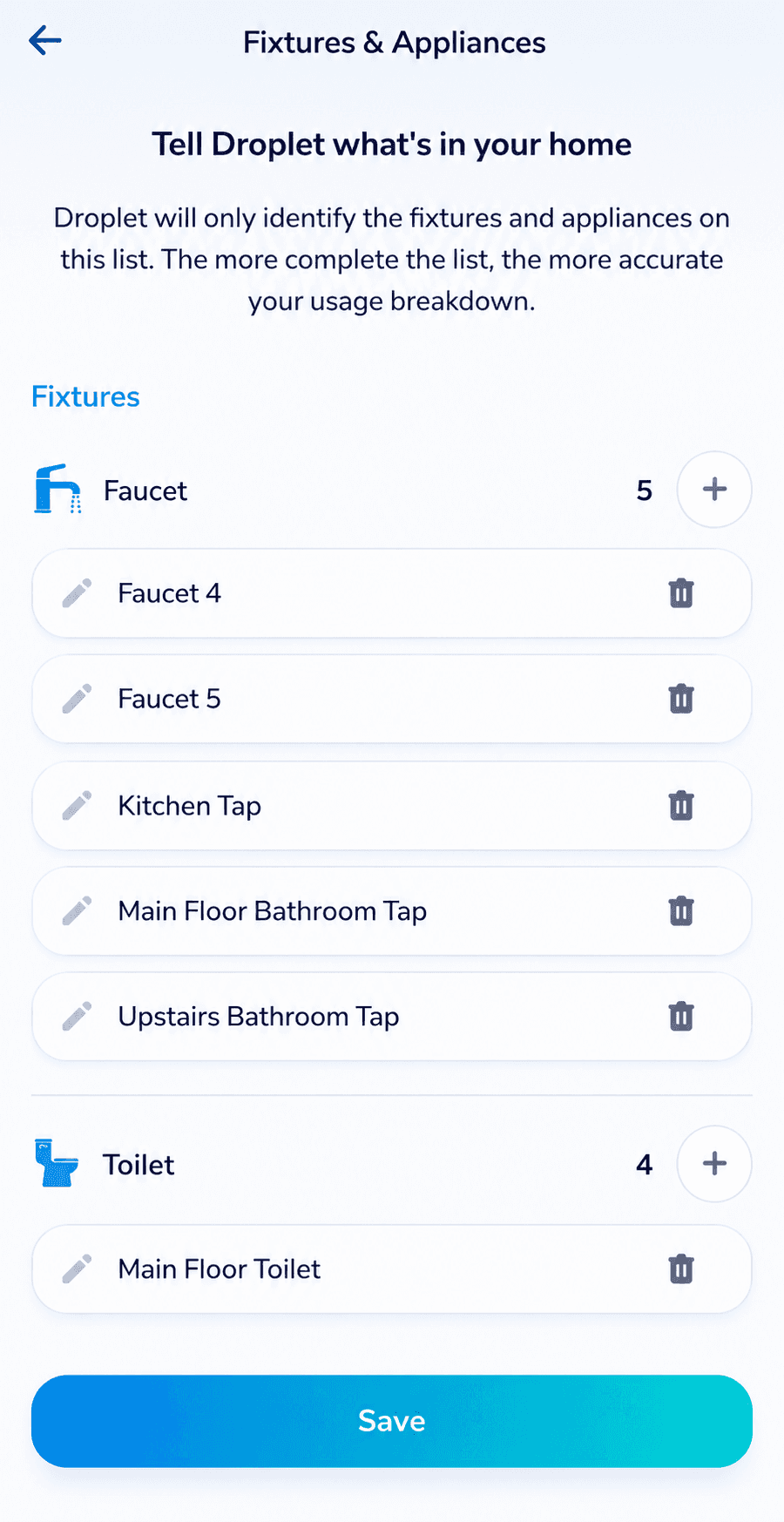
The Droplet identifies fixtures from their flow patterns. That works well, but many fixtures in a house share the same flow rate. Matching bathroom faucets and identical toilets look almost the same to a flow sensor. In my month of use I haven’t seen it mislabel anything, but I can see it getting things wrong if it isn’t properly trained.
So I trained it proactively, and I’d recommend you do the same in your first week:
- Turn on one fixture at a time, for example the left sink in the main bathroom.
- While it’s running, open the app and tag the live event.
- Assign it to that specific fixture or device.
- Repeat for each identical fixture, then for appliances like the dishwasher and washing machine.
It takes a few minutes, but it was good for my sanity and makes the history much better organised. Instead of a vague “faucet” event, you see exactly which bathroom it was.
What It Doesn’t Do
- No automatic shutoff. The Droplet alerts you, but it can’t close your main valve on its own. Hydrific says it works with Home Assistant, so you can automate a shutoff if you add a smart valve, which usually means a plumber.
- Needs power and Wi-Fi at the pipe. It’s plug-in, not battery-powered, so you need an outlet within about 5 ft of the install spot, plus Wi-Fi coverage there.
- New patterns need a moment of training. Long, legitimate flows like an RO fill will trigger an alert the first time, and identical fixtures can look alike until you tag them. Tagging fixes both, but expect a few “is this normal?” notifications in the first weeks.
Who Should Buy It
- Homeowners who want to catch leaks early without cutting into a pipe
- Anyone with irrigation, a softener, an RO system or an aquarium who wants to see what they really use
- People who travel and want to know if water is running in an empty house
- Data nerds who simply like seeing exactly where the water goes
Pro Tip: Ask Your Home Insurer About a Discount
Before you buy, or right after you install it, call your home insurance provider. Some insurers offer a discount if you have a connected or monitored water leak sensor, because water damage is one of the most common and expensive home insurance claims.
Mine did. Here in Ontario my insurer gave me a discount for having the Droplet installed. It was small, but it chips away at the cost every year.
Verdict
After a month, the Droplet has earned its spot on my main line. It’s accurate, sensitive enough to catch the smallest flow, and the app makes the data genuinely useful, with custom tags, threshold alerts and daily and weekly reports. It found water use in my house I didn’t know about, and that’s exactly what you want from a monitor like this.
The lack of a built-in shutoff is the main thing to know going in. As a no-subscription monitor that installs in minutes, though, it’s easy to recommend. This is one I’ll definitely buy.
Get the Hydrific Droplet: buy with our discount link or use code anythingtech at checkout to save (US$31 off in the US and C$44.81 off in Canada when I checked).


